

Chat EPDocs
ProductsCommerce Search

Commerce Search that understands shoppers and answers to your business

Commerce Search that ranks every result by what the shopper means, runs it on your commercial rules, and shows your team why each product sits where it does.

Trusted by Kroger, Carrefour, BSH (Bosch/Siemens), Chedraui, Primor and Farmacias del Ahorro.

Request a demo

Contextualize

Contextualize reads the intent behind every query from what shoppers did after searching it, then re-ranks the results to match. The first row answers what the shopper meant, not just what they typed, and not just what sells most overall.

Abstract illustration of search results re-ranked by intent
01Every query, its own context

Rank by what this query means

The same word means different things in different searches. Contextualize learns which one your shoppers mean.

Every query carries its own history: which products shoppers clicked, added to cart and bought after searching it. Contextualize turns those collective signals into a relevance model per query, then adds points to the products and attribute values that match that intent — at query time, on every search.

02Always current

Rankings that move with your shoppers

Trends, seasons and new favourites show up in the ranking without anyone rewriting a rule.

Relevance models rebuild continuously from fresh events, so trending products rise on their own and fading ones step back. Your team decides which signals count (clicks, add-to-cart, checkout) and which attributes matter (size, colour, brand), all from the Playboard.

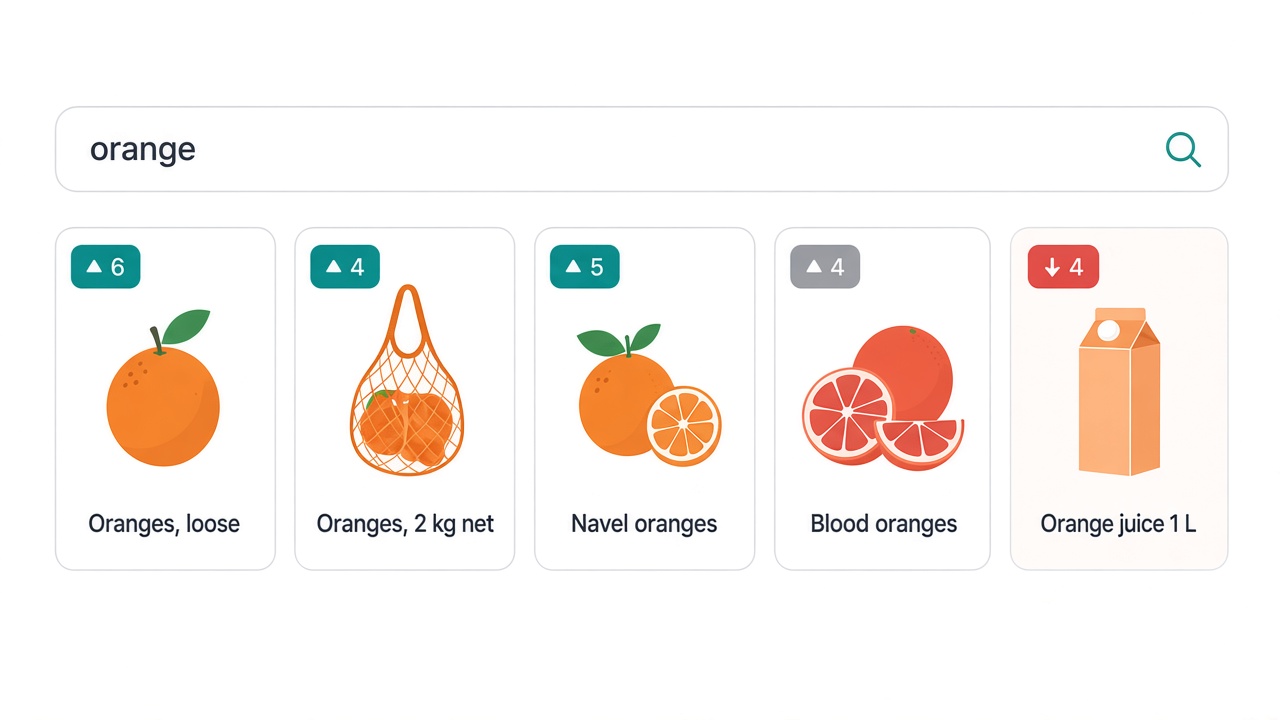
A grocery shopper searches “orange”. Orange juice may be your best-selling product overall, but that isn't what people buying from this search want. Contextualize knows that shoppers who search “orange” go on to buy the fruit, so loose oranges and nets of oranges lead the results, and juice follows further down — where shoppers who search “orange juice” will find it first anyway.

Built from anonymised, collective behaviour tied to the query. No shopper IDs, no profiles, no personal data.

Contextualize re-ranking an orange search toward fruit over juice

Equalize + Explain

Equalize lets you tune search commercially: you write the ranking rules your business runs on, and they apply to every result. Explain shows exactly why each product sits where it does, in terms a merchandiser can act on — no engineer needed.

Abstract illustration of ranking weight sliders and score breakdown
01Equalize

Your rules run the ranking

Stock, promotions, units sold, new in, own brand vs third party — weighted the way your strategy needs.

Equalize weights the catalogue attributes that decide ranking across three criteria: textual match (which fields matter most when words match), global business rules (lift or lower attributes like On sale or New in) and function score (numeric KPIs such as stock, margin or units sold). Set different configurations per store, language or device, preview the results before they go live, and A/B test one configuration against another.

02Explain

Ranking anyone on the team can read

Every product's position, broken down point by point.

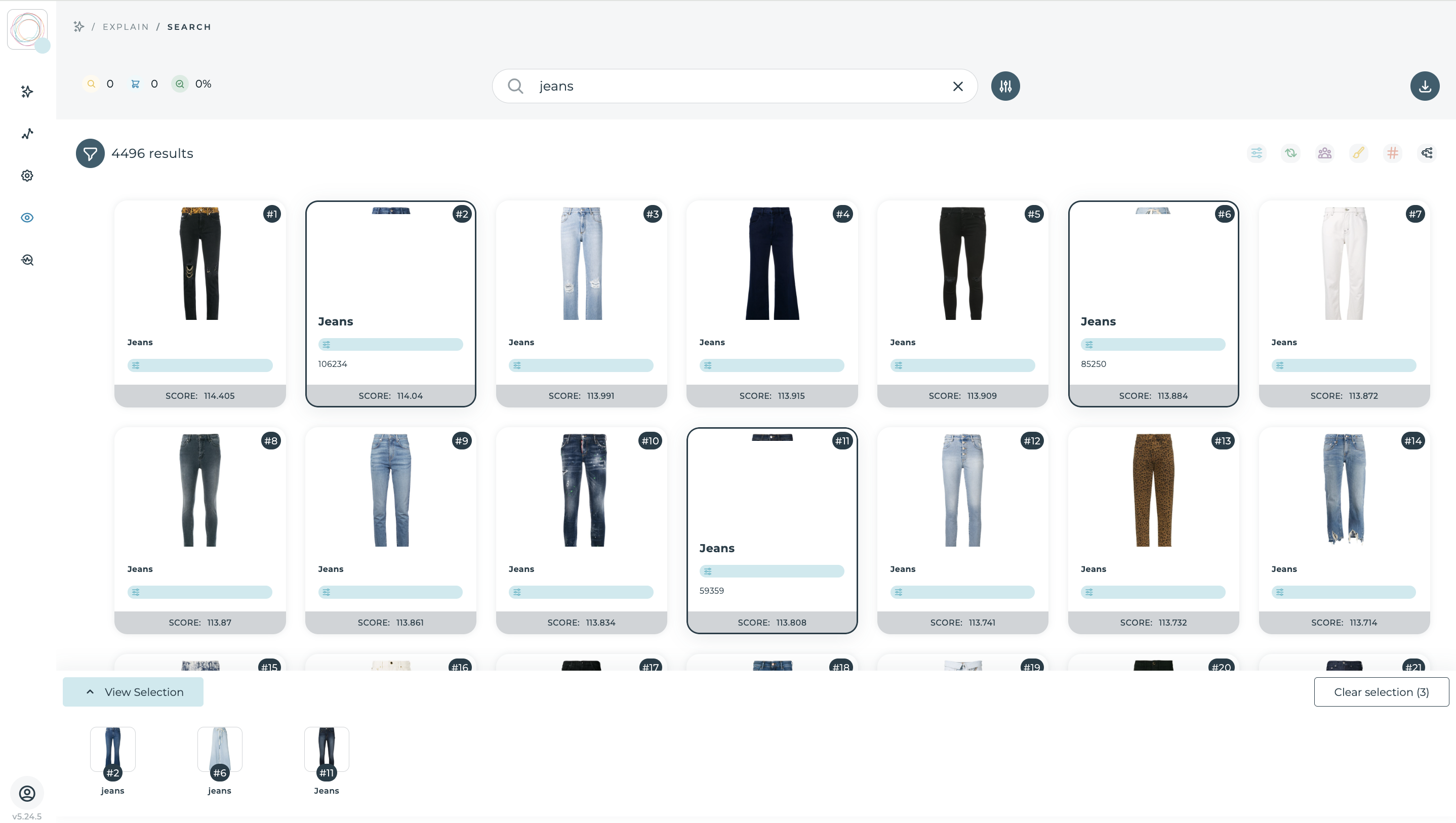
Explain opens any query and shows each product's total score split by what built it: Equalize, merchandising rules, collective shopper behaviour and term position. Compare two products side by side, see which tiebreaker separated them, and jump straight to the tool that changes it. Merchandising teams stop asking “why is this here?” and start fixing it.

During Black Friday, a retailer raises the weight of On sale and in-stock products and lowers New in. Promoted, available items lead every search; out-of-stock items drop to the bottom instead of wasting clicks. When the category manager asks why their own-brand pasta is second, Explain shows the answer in one screen: strong textual match, high sales, but a competitor's promotion scored higher — and a link to adjust it.

Equalize ranking weights and Explain score breakdown in Empathy Playboard

Merchandising

General rules set the baseline; campaigns need exceptions. Merchandising gives your team drag-and-drop Boost, Bury, Pin and No-show controls to override the organic ranking on any query or category page, so every campaign, brand deal and retail media commitment shows up exactly where you agreed it would.

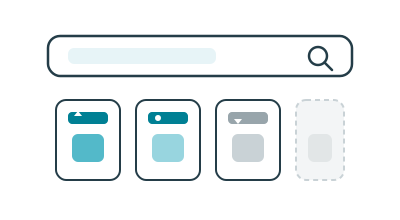
Abstract illustration of boost, pin, bury and no-show product controls
01Soft controls

Nudge, don't break, the ranking

Boost or bury an attribute value — a brand, a fabric, a range — without overriding relevance.

Attribute boosts and buries shift scores gently. Products with that value rise or fall; everything else keeps its relevance logic. Use them for a brand week, a supplier promotion or a range you want to lift across many queries at once.

02Hard controls

Put the right product in the right slot

Pin to an exact position, send to the top or bottom, or hide it entirely.

Pin a product to position 3 on page one, send a hero item to the top, bury low-margin lines, or hide a product or a whole attribute group with No-show. Drag to reorder, paste product IDs in bulk, and turn no-result queries into results you choose.

03Campaign-ready

Scheduled, previewed, tracked

Set it up once; it starts and stops on its own.

Every rule runs always-on or between a start and end date. Preview it on any date before it goes live, tag it with an ID for A/B testing in your own tool, and see in Activity Stream who changed what, and when.

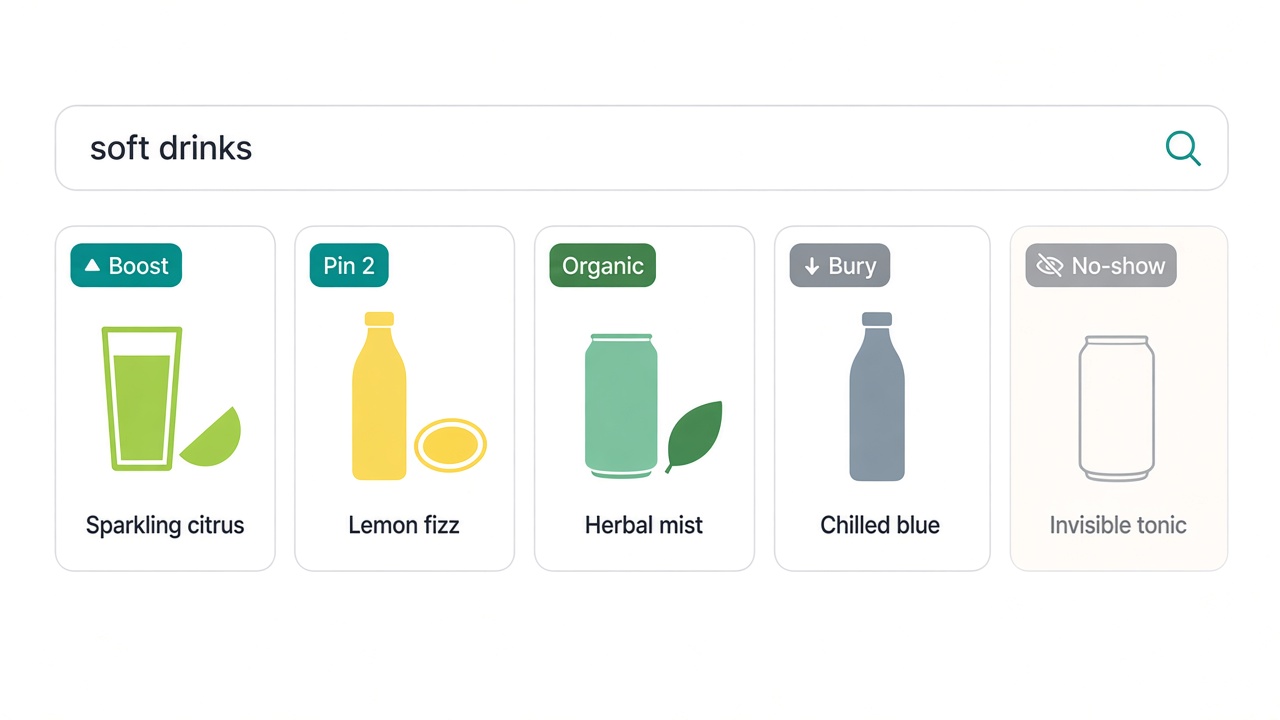
A summer drinks campaign starts on 1 July. The merchandiser pins the partner brand's new lemonade to position 2 for “soft drinks”, boosts the campaign range across drinks queries, hides a discontinued line, and schedules all of it to end on 31 August. On 1 September, the ranking goes back to organic by itself.

Results Ranking preview with pin, boost, bury and no-show on soft drinks

Insights

The search bar is where demand shows up first. Insights turns every query into a live read of what your customers want, so you can understand it, anticipate it and act on it before the sales peak.

Abstract illustration of search demand bubbles and trend signals
01Right now

See demand as it forms

What shoppers are searching for in the last 15 minutes, hour or 12 hours — and what they aren't finding.

Watch live queries, clicks and dead ends as they happen in Now. Spot the words gaining ground over a day, a week or a month in Terms, and get suggestions, stock and campaigns ready while the trend is still rising.

02Over time

Measure what search is worth

CTR, findability, add-to-cart and checkout for every query and every category.

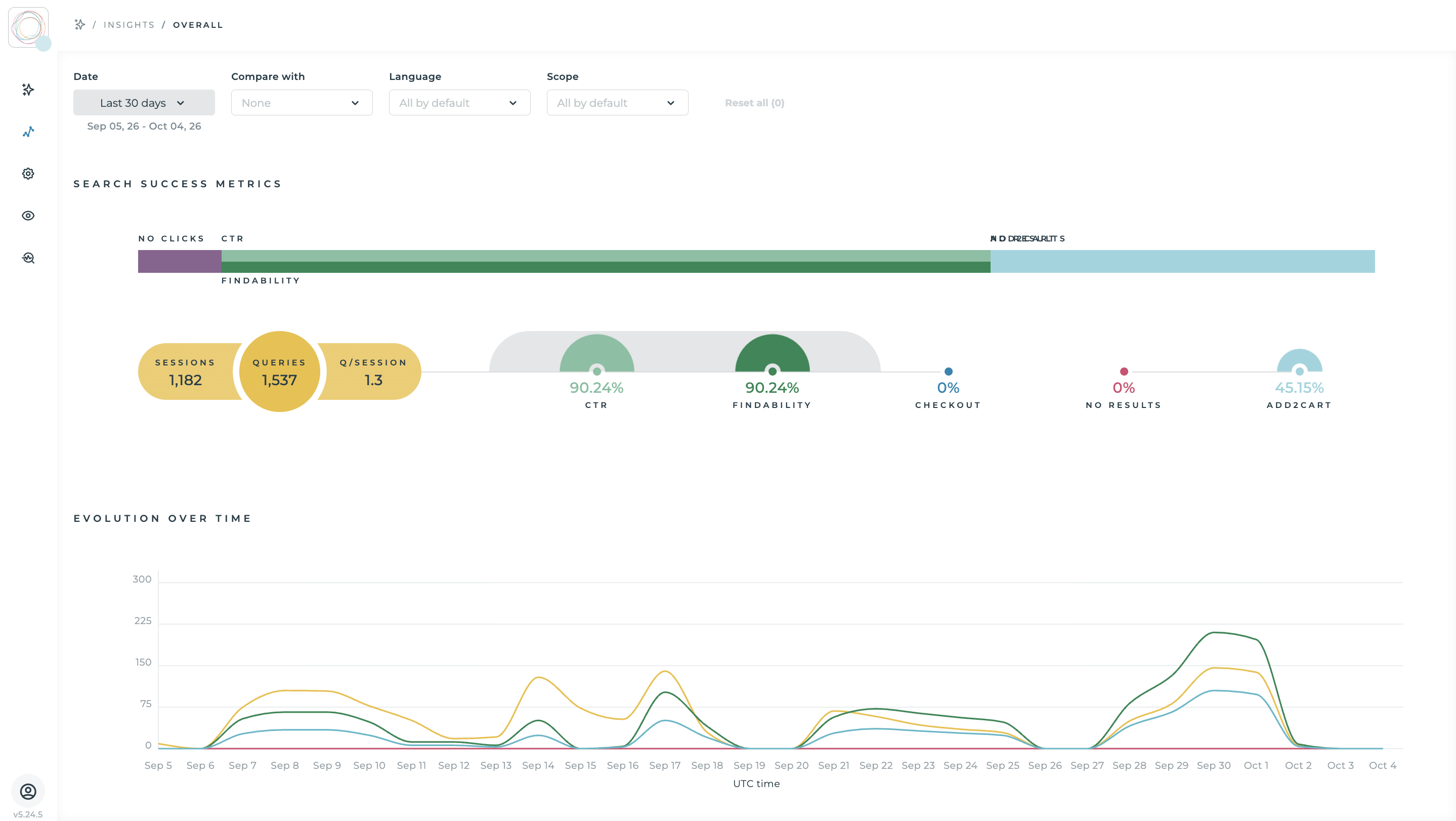
Overall and Queries track search performance over any period, year on year, by store, language or device. Categories shows which parts of the catalogue convert from search and which lose shoppers. Browse Metrics does the same for category navigation.

03Straight to action

From insight to fix in one click

Spot a zero-result query or a weak category, then fix it with Merchandising or Equalize in the same Playboard.

Zero-result reports show exactly where the catalogue or the ranking needs work. Origins shows whether shoppers arrive by typing or through suggestions, so you know which to fix first.

Three weeks before back-to-school, Terms shows “lunch box” and “water bottle” climbing and Now flags “insulated lunch bag” as a frequent zero-result query. The team adds a synonym, boosts the range and checks stock — before the peak, not after it.

Insights live search demand and search success metrics in Empathy Playboard

The AI commerce search leading retailers trust with every query

From grocery to pharmacy to home appliances, Empathy Platform runs search for retailers where every query is a sale waiting to happen.

Kroger
Carrefour
BSH
Primor
Farmacias del Ahorro

Empathy's approach to AI

Empathy AI runs on self-hosted GPUs and open-source LLMs on proprietary infrastructure. No AWS, no OpenAI tax, no data leaving the building.

Compute

Dedicated GPU cluster

Powered by the solar canopy on the Empathy AI building. No public cloud, no shared tenancy.

Models

Open-source LLMs only

Built on open-weight models Empathy uses and contributes to — auditable, replaceable, yours.

Data

Privacy-first

Your documents and prompts are processed locally. Nothing is sent to third-party AI providers.

Ops

Continuous oversight

The stack is monitored, evaluated and adapted continuously — transparency by design, not by audit.

Empathy AI building

Your shoppers' intent and preferences are yours. Keep them that way.

Whatever your industry, the search bar is the most honest expression of intent and preference a shopper ever gives you. What they actually want, in their own words, at the moment they want it. Run that through Big Tech's AI and it doesn't just answer your shopper, it trains someone else's model too. Empathy Platform keeps it inside your walls: your infrastructure, your rules and your data never leaving your control.

The intent

Your shoppers are telling you everything

Millions of queries reveal exactly what your shoppers want and prefer, query after query. Keep that intelligence on your side of the table, not inside someone else’s model.

The logic

Your rules run the ranking

Promotions, margins, seasonal strategy, brand agreements — commercial decisions applied to every result, configured by your teams, not a generic algorithm.

The edge

What your data knows, no one else does

Years of shopper behaviour and merchandising decisions are competitive advantage, not just data. Run them through a generic model and that advantage stops being exclusively yours.

FAQ

Questions about AI commerce search

Next step

See Commerce Search on your catalogue.

Bring your real queries. We'll show you how Commerce Search ranks them by intent, runs them on your rules and explains every position, so you can judge it on your own catalogue.